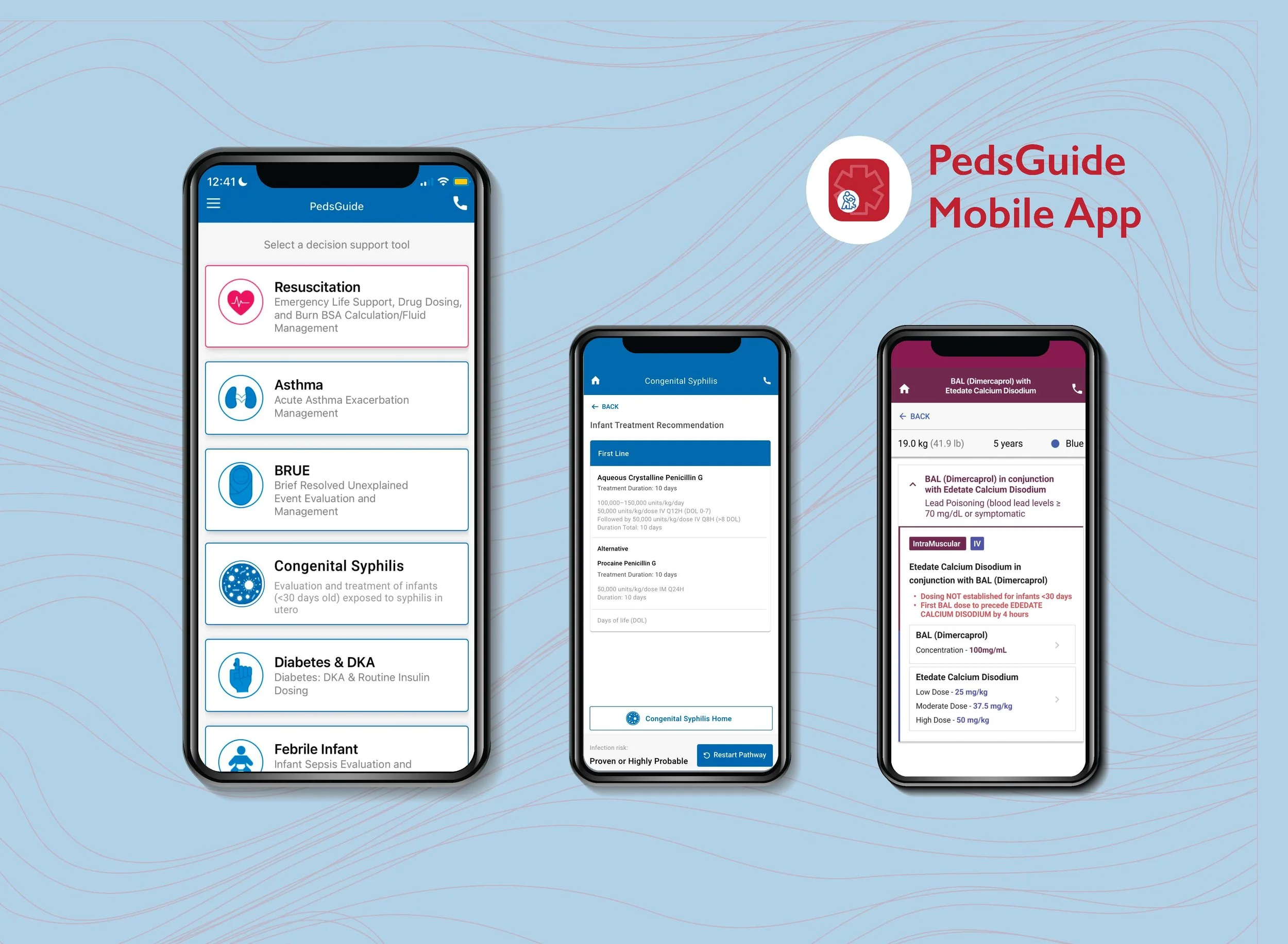
PedsGuide Mobile App
Clinical decision support for pediatric emergencies
Overview
PedsGuide is a mobile clinical decision-support app designed to help healthcare providers quickly access evidence-based pediatric guidelines at the point of care. As the product expanded to support additional clinical conditions, the challenge became creating consistent, intuitive experiences while accommodating the unique workflows and information needs of each specialty.
Over several years, I have collaborated with clinicians, Human Factors specialists, and developers to design and refine multiple modules, translating complex medical content into clear, actionable experiences. My work included workflow analysis, UI design, prototyping, and iterative improvements across the evolving product.
Problem
As PedsGuide expanded from a small collection of clinical guidelines into a multi-module pediatric decision-support app, the complexity of the system increased. New modules introduced additional workflows, stakeholders, and clinical content requirements, creating a need to maintain a consistent, intuitive experience for providers working in high-pressure environments.
Solution
Through ongoing UX involvement, I helped evaluate, design, and refine PedsGuide modules by translating complex clinical workflows into structured, accessible mobile experiences. I collaborated with clinical champions, project managers, and developers, to create interfaces that supported rapid decision-making while reducing unnecessary cognitive effort.
My Involvement
I serve as a UX designer and researcher, supporting PedsGuide through workflow analysis, interface design, prototyping, stakeholder collaboration, and iterative improvements across multiple clinical decision-support modules.
Methods
Literature Review · Surveys · Personas · Journey Mapping · Workflow Analysis · Prototyping · Comparative Usability Reviews
My Role
UX designer · UX researcher
Team
UX Specialist · Pediatric Hospitalist · Human Factors Scientist · Countless Clinical Champions · Project Managers · Developers
2018–2023 - Supported initial PedsGuide modules by contributing to UX design, workflow improvements, and iterative refinements within the existing product framework.
2024–Present - Designed and supported additional modules:
ADHD (Attention-Deficit/Hyperactivity Disorder)
Autism Spectrum Disorder
Congenital Syphilis
Drugs in Pediatric Emergencies
Head Injury
Seizure & Epilepsy
Tracheostomy
Project Timeline
Existing App Growth → Stakeholder Alignment → Clinical Workflow Analysis → Module Design → Prototype → Collaboration → Ongoing Improvements
Challenge
As PedsGuide grew, each new module introduced unique clinical workflows, content requirements, and stakeholder expectations. The challenge was creating experiences that were flexible enough to support different medical scenarios while maintaining consistency across the app.
How do you design a consistent clinical decision-support experience when each new module has different users, workflows, and information needs?
Design Process
Step 1: Define the Problem & Align with Stakeholders
Each PedsGuide module begins with stakeholder alignment. I collaborate with clinical champions (subject matter experts), project managers, and Children’s Mercy Center for Pediatric Innovation team to define the module’s goals, intended users, timeline, and the clinical problem we are working to solve.
During these early conversations, I review the clinical algorithm with stakeholders to understand the decision-making process, workflow, and information requirements. This alignment helps ensure the final design supports both clinical accuracy and the needs of providers using the tool at the point of care.
As the only designer on the team, I am responsible for translating these clinical workflows into clear, intuitive user experiences.
Step 2: Research
Clinical champions provide the medical research and specific algorithm they would like to use for their module. My research focuses on understanding the clinical algorithm, workflow, evidence-based recommendations, and decisions providers need to make throughout the algorithm.
I review supporting medical resources and clinical references to build enough knowledge to accurately translate this complex medical information into a usable interface.
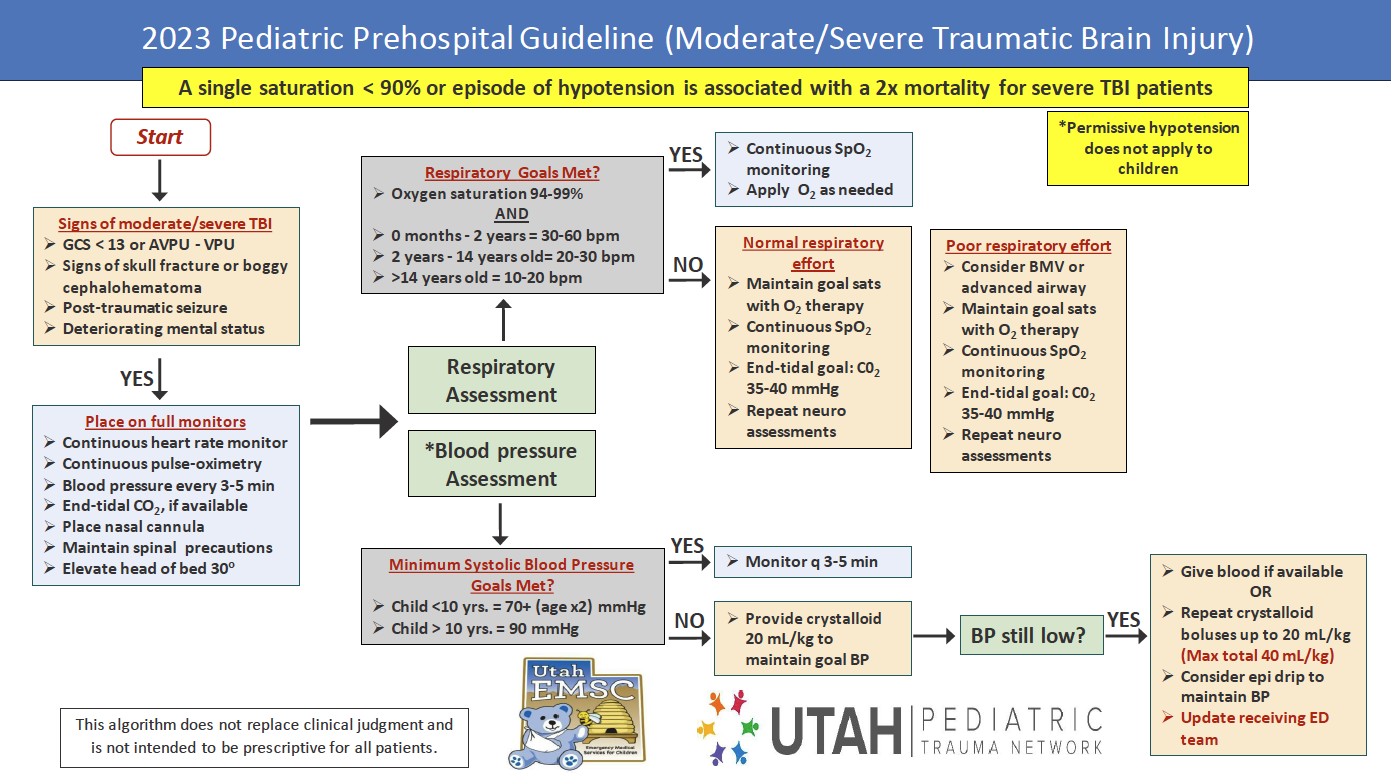
Algorithms
Below are two examples of clinical algorithms used within PedsGuide modules. These clinical pathways serve as the starting point for the UX process, allowing me to translate complex decision-making into structured screen flows that support providers through each step of the workflow.
Clinical Algorithm Example: Congenital Syphilis module

Clinical Algorithm Example: Head Injury Module
Step 3: Ideate
Once I understand the clinical workflow, I begin exploring how the algorithm can be transformed into an effective user experience. This includes reviewing existing PedsGuide module patterns, sketching potential layouts, and identifying opportunities to simplify complex decision points.
At times, clinical champions provide early concepts or draft screens to communicate their ideas. I use these as a starting point, combining their clinical expertise with UX principles to develop a cohesive experience that aligns with the PedsGuide design system.
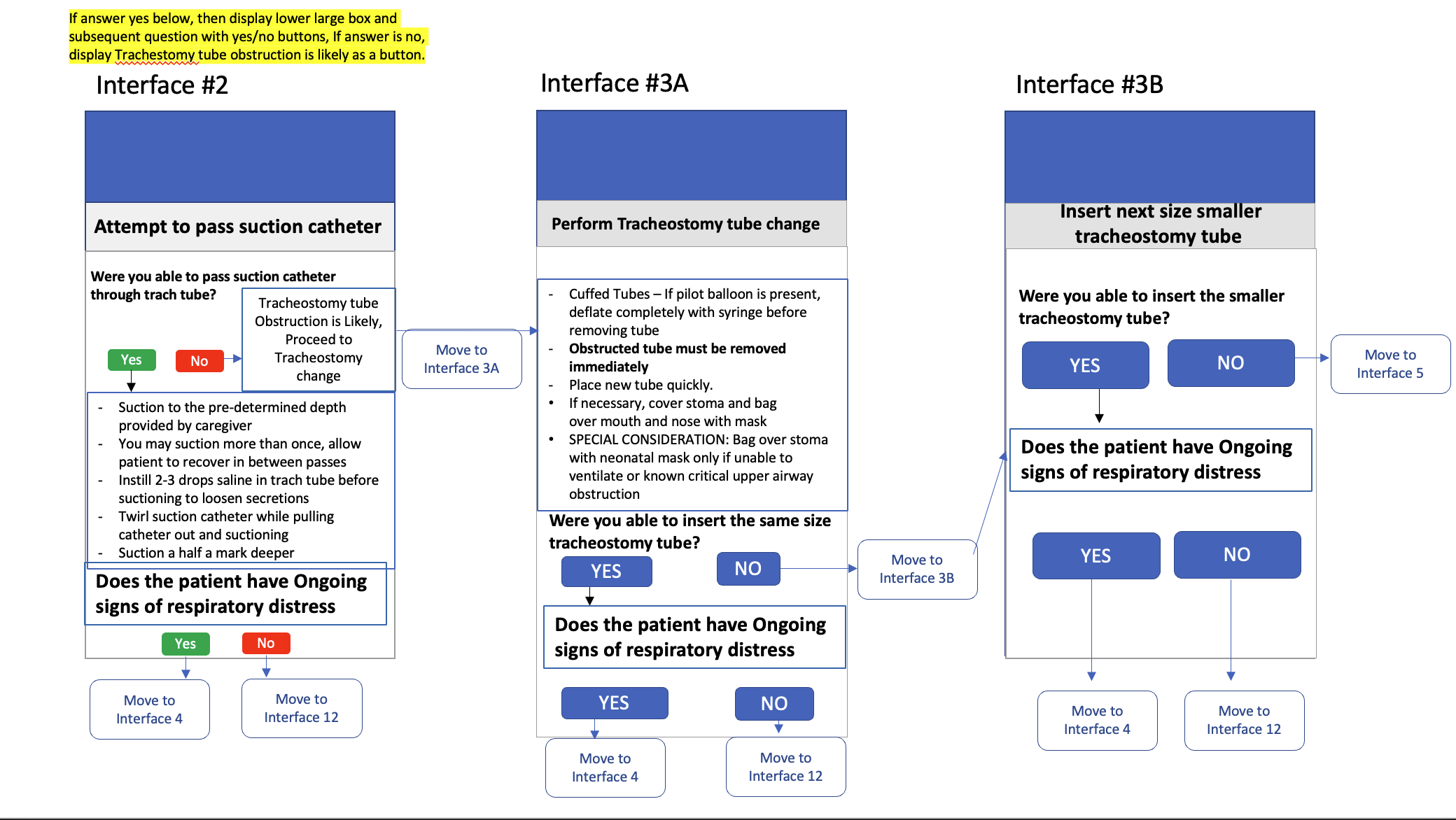
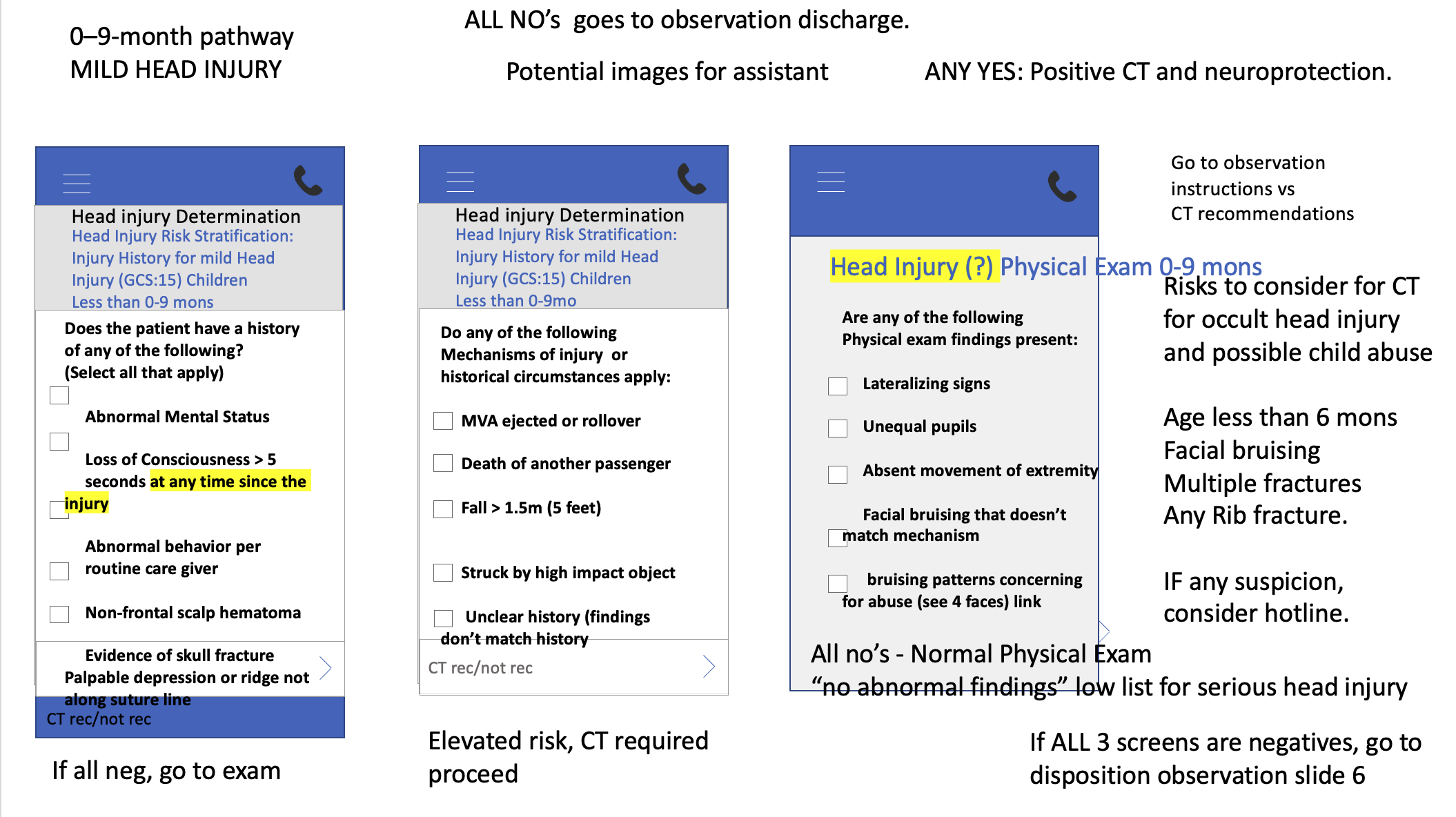
Early Concept Screens
Below are two examples of early concept screens created by clinical champions. These concepts provide valuable insight into clinical priorities and desired functionality, but they often require UX refinement to translate complex clinical ideas into clear, intuitive workflows.
Clinical Champion’s Early Concept Screens Example: Tracheostomy module
Clinical Champion’s Early Concept Screens Example: Tracheostomy module Head Injury Module
Step 4: Prototype
I translate the clinical algorithm into interactive screens using Figma (or Adobe XD for the Congenital Syphilis module). This is typically the most time-intensive stage because complex medical algorithms must be transformed into clear, actionable workflows.
Throughout the design process, I focus on information hierarchy, readability, navigation, and reducing unnecessary cognitive effort while ensuring the clinical content remains accurate and complete.
Step 5: Stakeholder Review & Iteration
Once an initial prototype is complete, I review the design with clinical champions, project managers, and developers. These reviews help validate that the workflow accurately represents clinical decision-making, identify areas of confusion, and ensure the experience supports providers’ needs. Through multiple rounds of feedback, I refine my design by balancing clinical requirements with usability principles. This often involves simplifying complex information, improving navigation, adjusting content hierarchy, and clarifying interactions while maintaining the accuracy of the clinical algorithm.
After incorporating feedback, the finalized designs are prepared for development and continued iteration throughout implementation.
For more complex modules, clinical champions and I work through each decision point in the algorithm to determine how information should be structured within the provider workflow. During the Head Injury module, I held multiple in-person design sessions with the clinical champion to break down and combine two complex clinical algorithms. During these sessions, I made real-time updates to the prototype as we reviewed each decision point, allowing us to quickly evaluate design solutions and align the digital experience with the clinical workflow. These sessions helped ensure the final experience maintained clinical accuracy while presenting recommendations in a clear, logical sequence that supported provider decision-making.
Key Insight!
Clinical guidelines are designed for medical experts, but digital tools must support providers at the moment decisions are being made. The challenge was not simplifying clinical recommendations, but structuring complex decision pathways into clear, actionable workflows.
Design Principles
Throughout the development of each PedsGuide module, I focused on three principles:
Reduce cognitive effort during clinical decision-making
Providers need access to complex medical information quickly. The experience should reduce unnecessary mental workload by organizing information clearly and guiding users through each step.Preserve clinical accuracy while improving usability
Every design decision must support the validated clinical pathway while making complex recommendations easier for providers to understand and navigate.Create consistency across diverse clinical workflows
Each module addresses a different medical scenario, but providers should experience familiar patterns and interactions throughout the app.
Step 6: Clinical Validation, Development Handoff & Iteration
After completing the initial prototype, I validate the workflow with clinical champions to ensure each screen accurately represents the clinical algorithm and supports provider decision-making. I review the complete module flow with clinicians, gather feedback, and make necessary updates until the experience aligns with both clinical requirements and usability goals.
This validation process can involve multiple rounds of iteration over several months, or longer for more complex algorithms, as clinical workflows are refined and stakeholder availability varies.
Step 7: Development Collaboration
Once the designs are approved, the CM team holds a kickoff meeting with the external development team. During this process, I walk the developer and project mananger through the screens, interactions, and design decisions to ensure they understand the intended experience.
My involvement continues throughout development. As the developer begins implementation, new questions may emerge that were not identified during initial design discussions. I collaborate with the team to create additional screens, clarify interactions, and refine existing designs, as needed.
Step 8: Continued Iteration
Because healthcare is constantly evolving, PedsGuide requires ongoing maintenance and updates. Clinical guidelines, treatment recommendations, and medication dosing information change over time, requiring continued collaboration between clinicians, developers, and UX to ensure the app remains accurate and useful for providers.
Conclusion
PedsGuide is an evolving clinical decision-support tool that requires continuous collaboration and iteration. Over my several years of involvement with PedsGuide, I have contributed to the continued evolution of a clinical decision-support tool that helps pediatric providers access evidence-based guidelines at the point of care. Each module has required close collaboration with clinical experts, developers, and project teams to transform complex medical guidelines into clear, actionable workflows. Through this iterative process, I have helped create experiences that support providers while adapting to the changing needs of healthcare.
PedsGuide - Congenital Syphilis Module
PedsGuide - Drugs in Pediatric Emergencies